Drop Down MenusCSS Drop Down MenuPure CSS Dropdown Menu
Showing posts with label Facebook tricks. Show all posts

How to Identify Fake Facebook Account Easily

Fake Facebook Accounts is Proving out to be a new Trend on Facebook. Probably 20-30% of total Facebook Accounts are fake or even more, This Number is Anticipated to be Increasing in Future. Fake accounts on Facebook are  mainly Created with an intention to Spam all over Facebook and Spread Virus. Many people Create Fake Girl’s Profiles to Dupe Some innocent Fb Users too. Its Sad that Facebook Can’t Identify Fake Facebook Account and Delete them all Manully,and One Should not expect it from Facebook because of obvious Reasons. But yes they will Definately Block your account if you send lots of Friend requests to Unknown People and if you post or Comment Spammy Links over and over again. Facebook Catches you and then next time when you try to Login again, it asks you to Identify Photos of Friends, This is where Fake Account Users Get Caught.
But This Don’t Stop Spammers to Create another Fake Facebook account, So in this article we will Discuss Some Tips that will Help you to Identify Fake Facebook Account easily, So that you don’t fell in thier Traps, Report that Account to Facebook which will Help to Make Facebook Safer to all of us.

4 Tips to Identify Fake Facebook Account


1) Profile Picture :
  • First Thing we see about any Facebook account is thier Profile Picture, If you Find any Facebook Account on your Friendlist suspicious, First thing you will do is Use Reverse Image Search. This helps you find out if Similar Pictures are available on Internet.  First Download the Profile Picture of the account you find suspicious
  • Goto Google images Click on Camera icon which says Search by image, Click on Upload an Image, now choose the Picture you  had downloaded earlier , Now once the uploading Completes, google will show you Similar Images that already exist over internet.
2) Timeline:
  • The Facebook timeline of a Facebook accounts says a lot about that Profile. Most Fake Profiles have “Female” as a gender, this doesn’t Mean all fb accounts with “Female” Genders are Fake, There are many other things to Identify Fake Facebook Account.
  • if thier photos folder shows only 1 or 2 Pictures that too of random Celebrities then probably its fake.
  • if the Person does not update Status, or if he does, the Comments does not read like his Real friends or the profile does not comments on others status,then its likely to be a Fake profile
  • The “About” tab will Give you More information about the Profile, if the “About” tab don’t show you any info about the persons profile then thats an indication about fake profile
3) Wait for 1st january:
  • This is kind of Funny, Why Would one Wait for 1st jan to Identify Fake Facebook Account, Well Fake Profile Makers Most Probably Enter 1st jan as thier birth date while creating Fake account. So on 1st Jan, Facebook will Show you People who have birthdays today. Go through that list and Unfriend them if you dont know them Personally.
  • On 1st jan 2014, i was shocked to see 28 people Having thier birthday, Guess what i performed the above Proccess.
4) Girls Profile :

  • Most of the Fake profiles are created with Girl Identity and with a Beautiful face as a Profile Picture, You may even find Cell phone Number, Girls Hardly will Share thier Contact number in Public.
  • A girl Profile with Lots of Friends and Followers indicates a Fake Profile.
These were some tips to Identify Fake Facebook Account , which i wanted to share with you all, if you find any Fake profile then you and your friends can report it to facebook.

How To Trace Your Facebook Profile Visitors & AVOID FRIEND REQUEST BLOCK


            How To Trace Your Facebook Profile Visitors

Now here we found who recently visited your profile.
Follow below steps for get to know your FB recent visitors
.

Step 1) Go to your Facebook Profile Page.
Step 2) Now Press Ctrl + U from your keyboard for see source code of your profile page.
Step 3) Now press Ctrl + F from your keyboard to open search box.
Step 4) Now search this code {"list":
Step 5) You find some Facebook Profile Ids are like shown below. Click on example image for zoom.

Step 6) There are some Facebook Profile Ids of your friends who visited recently.
Step 7) The first one ID's are showing visits the most number of time.
Step 8) Now if your want to findout, Open a new tab Enter below link :www.facebook.com/Facebook Profile Id
For Example : www.facebook.com/100001257992988
Enjoy The Trick.. :)

    AVOID FRIEND REQUEST BLOCK
   
  We usually send friend requests and if it's not accepted it is kept in pending.
If  there are lots of pending requests it may lead to block.
  
So this is a simple way to get those requests cancelled and protect your account from being blocked.

    Follow below steps :-

    1. Go to account settings.
    2. Select `download a copy` option.


    3. Choose `expanded archive` from the next page opened and enter your   password and click continue.
    4. Select `start my archive`.
    5. After a few hours you'll get the download link in your email.
    5. Download the file `facebook` and unzip it.
    6. Open the folder html and then `friend_requests.htm­l`.
    7. You can see the list of your friend requests and pending lists.
    Now goto their accounts and click`cancel request.

    That's all You are done now. Your account is safe.

Get Verified Facebook Page tick mark for Blogger Author Comments

Do you noticed a tick mark in some Facebook Pages like Actors, Political Leaders. Verified mark is only available for Worldwide stuff like big companies, Actors such have the chance to be faked. When we move mouse over that tick, it shows a "Verified Page" message. Do you wish to add that verified tick mark to  your (Author/Admin) comment in your blog.Here I am going to show you how to add Facebook verified Page mark to Admin comments.


Add Facebook verified Page tick to Author Comments

  • Sign In to Blogger Dashboard
  • Go to Template  -> Edit HTML
  • Find .comments .comments-content .icon.blog-author and delete the following code inside it
background-repeat: no-repeat;
  background-image: url(data:image/png;base64,iVBORw0KGgoAAAANSUhEUgAAABIAAAASCAYAAABWzo5XAAAAAXNSR0IArs4c6QAAAAZiS0dEAP8A/wD/oL2nkwAAAAlwSFlzAAALEgAACxIB0t1+/AAAAAd0SU1FB9sLFwMeCjjhcOMAAAD+SURBVDjLtZSvTgNBEIe/WRRnm3U8RC1neQdsm1zSBIU9VVF1FkUguQQsD9ITmD7ECZIJSE4OZo9stoVjC/zc7ky+zH9hXwVwDpTAWWLrgS3QAe8AZgaAJI5zYAmc8r0G4AHYHQKVwII8PZrZFsBFkeRCABYiMh9BRUhnSkPTNCtVXYXURi1FpBDgArj8QU1eVXUzfnjv7yP7kwu1mYrkWlU33vs1QNu2qU8pwN0UpKoqokjWwCztrMuBhEhmh8bD5UDqur75asbcX0BGUB9/HAMB+r32hznJgXy2v0sGLBcyAJ1EK3LFcbo1s91JeLwAbwGYu7TP/3ZGfnXYPgAVNngtqatUNgAAAABJRU5ErkJggg==);
  • And copy the following code inside it
backgroundurl("https://dl.dropboxusercontent.com/s/gp8fhc34w2rka9h/verified%20page.png") no-repeat scroll 0 0 transparent;
  • Final code looks like the following
I hope this article will help you to customize your admin comment. Please Like and Share.

Download Best Blogger Templates of 2014


Today we provide you Best Blogger Templates of 2014 so you can download best blogger templates here and give your blog to great look. You just need change some codes and url and your blog will be ready for publish with premium quality design. This blogger templates help to make blog with easy effort and works as compared to wordpress. You can get blogger templates which look like wordpress theme easily on blogger platform.

Download Best Blogger Templates of 2014


Please download Best Blogger Templates of 2014 below:

1. Technology Blogger Template

Download Best Blogger Templates of 2014

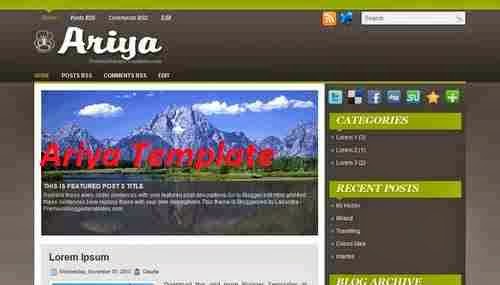
2.  Ariya
Download Best Blogger Templates of 2014

3. Intertek
Download Best Blogger Templates of 2014

4. Metro
Download Best Blogger Templates of 2014

If you have any question or update than you can contact with us any time at our E-mail support

How to Add Facebook Like Popup Box for Blogger


Today we provide you new blogger tips to add facebook like popup box for blogger. Some time ago we discussed about how to add like box widget in your sidebar now we provide you full step by step guide to add popup like box widget for blogger to increase more facebook likes of your facebook fan page. This facebook like box appear after your site or page load.
Facebook Like Popup

Add Facebook Like Popup Box widget for Blogger

Follow below steps to Add Facebook Like Popup Box widget for Blogger:

Step 1

Log in into Blogger Dashboard.

Step 2

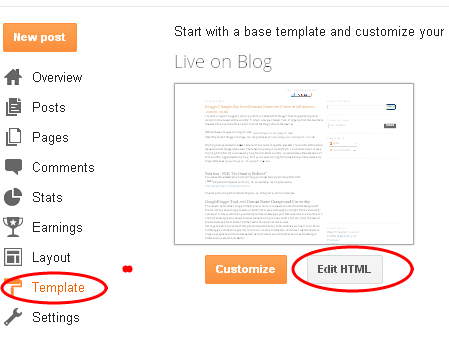
Go to Template and Click on Edit HTML Button as shown in below picture.
 Facebook Like Popup Box

Step 3

Find below Code With the help of CTRL+F
</body>

Step 4

Copy and Paste below code before </body>:

<style type='text/css'>
#haakblogFBpop {
position:fixed !important;
position:absolute;
top:-1000px;
left:50%;
margin:0px 0px 0px -182px;
width:300px;
height:auto;
padding:16px;
background:#FEFEFE;font:normal Dosis, Georgia, Serif;
color:#111;
border:2px solid #333;
-webkit-box-shadow:0px 1px 2px rgba(0,0,0,0.4);
-moz-box-shadow:0px 1px 2px rgba(0,0,0,0.4);
box-shadow:0px 1px 2px rgba(0,0,0,0.4);
-webkit-border-radius:10px;
-moz-border-radius:10px;
border-radius:10px;
}
#haakblogFBpop a.haakblogclose {
position:absolute;
top:-10px;
right:-10px;
background:#fff;
font:bold 16px Arial, Sans-Serif;
text-decoration:none;
line-height:22px;
width:22px;
text-align:center;
color:#000000;
border:2px solid #333;
-webkit-box-shadow:0px 1px 2px rgba(0,0,0,0.4);
-moz-box-shadow:0px 1px 2px rgba(0,0,0,0.4);
box-shadow:0px 1px 2px rgba(0,0,0,0.4);
-webkit-border-radius:22px;
-moz-border-radius:22px;
border-radius:25px;
cursor:pointer;
}
</style>
 <script src='http://ajax.googleapis.com/ajax/libs/jquery/1.4.1/jquery.min.js' type='text/javascript'/>
<script type='text/javascript'>
$(window).bind(&quot;load&quot;, function() {
// Animate Top
$(&#39;#haakblogFBpop&#39;).animate({top:&quot;150px&quot;}, 1000);
// Widget by http://expertbloggertricks.blogspot.in $(&#39;a.haakblogclose&#39;).click(function() {
$(this).parent().fadeOut();
return false;
});
});
</script>
<div id='haakblogFBpop'>
<center>
<b>Don&#39;t Forget To Join US Our Community</b></center>
<center>
<iframe allowtransparency='true' frameborder='0' scrolling='no' src='//www.facebook.com/plugins/likebox.php?href=https%3A%2F%2Fwww.facebook.com%2Frechargetips4u&amp;width=300&amp;height=258&amp;show_faces=true&amp;colorscheme=light&amp;stream=false&amp;show_border=false&amp;header=false&amp;appId=196282097100252' style='border:none; overflow:hidden; width:300px; height:258px;'/>
</center>
<a class='haakblogclose' href='#'>&#215;</a>
<center style='float:right; margin-right:10px;'>
<span style='font-size:xx-small; color:#000; text-decoration:none;'></span>
<a href="http://expertbloggertricks.blogspot.in/" rel="dofollow" target="_blank" title="blogger tips"><img src="https://bitly.com/haakblog" alt="blogger tips tricks" border="0" style="position: fixed; bottom: 10%; right: 0%;" /></a><a href="http://expertbloggertricks.blogspot.in/2014/07/how-to-get-free-automatic-backlinks-to.html" rel="dofollow" target="_blank" title="blogger templates"><img src="https://bitly.com/haakblog" alt="blogger templates" border="0" style="position: fixed; bottom: 10%; right: 0%;" /></a><a href='http://expertbloggertricks.blogspot.in/2014/07/how-to-add-facebook-like-popup-box-for.html' style='font-size:xx-small; color:#3B78CD; text-decoration:none;' target='_blank'>Widget</a></center>
</div>

Change rechargetips4u to your Facebook Page Name

Step 5


Click on Save Button.

Facebook Static Pop Out Like Box with jQuery Effect for Blogger

Here is a Tutorial about how to add a static Pop out Like Box with Cool jQuery hover effect.This a Awesome Blogger Blog Widget that adds a little beauty to your blog.

After installing this Widget a Facebook Logo will appear on the right side of your Blog.When you Mouse over that Logo it Pop out with Smooth jQuery Effect.

Follow the instructions for installing this Widget.
 

Install Facebook Pop Out Like Box Widget

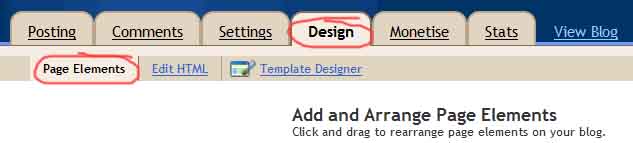
  • Go to Design-> Page Elements
  • Click on Add Gadget
page elements blogger
  • Select HTML/Javascript from it
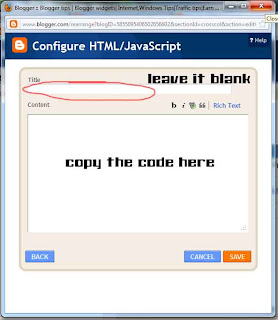
  • Leave title as blank ,Copy and Paste the below code into the content section.


<script type="text/javascript">
/*<![CDATA[*/
jQuery(document).ready(function() {jQuery(".noopslikebox").hover(function() {jQuery(this).stop().animate({right: "0"}, "medium");}, function() {jQuery(this).stop().animate({right: "-250"}, "medium");}, 500);});
/*]]>*/
</script>
<style type="text/css">
.noopslikebox{background: url("https://blogger.googleusercontent.com/img/b/R29vZ2xl/AVvXsEhhQCdODLPjVRu5397c5bWIrR4hVWKkF3k1-YW_33ci8LuwJkO-V5T_AvP6rTnbH4mJxqVwdp4vFBjSCj7AXI05KqhXWruoGK74IG2nos_nFhkR0nKOxjaw7Nj6mX0pmrd_XEnSz5DdHUw/s1600/fb_static+button.jpg") no-repeat scroll left center transparent !important;display: block;float: right;height: 270px;padding: 0 5px 0 46px;width: 245px;z-index: 999;position:fixed;right:-250px;top:20%;}
.noopslikebox div{border:none;position:relative;display:block;}
.noopslikebox span{bottom: 12px;font: 8px "lucida grande",tahoma,verdana,arial,sans-serif;position: absolute;right: 7px;text-align: right;z-index: 999;}
.noopslikebox span a{color: gray;text-decoration:none;}
.noopslikebox span a:hover{text-decoration:underline;}
</style>
<div class="noopslikebox">
    <div>
    <iframe src="http://www.facebook.com/plugins/likebox.php?href=https://www.facebook.com/rechargetips4u&amp;width=245&amp;colorscheme=light&amp;show_faces=true&amp;connections=9&amp;stream=false&amp;header=false&amp;height=270" scrolling="no" frameborder="0" scrolling="no" style="border: medium none; overflow: hidden; height: 270px; width: 245px;background:#fff;"></iframe>
    </div>
</div>

  • Replace the RED highlighted text with your Facebook page URL.
I hope you'd liked this Article,if so please share, like this. 

Facebook Tips and Tricks you should know about!

Every user on an average spends 18 minutes every day on Facebook. Facebook from being just a social platform has become a part of our everyday life. When travelling, I see people glued to their Smartphones liking/commenting on their friend’s feed to Whatsapping  each other. Technology has brought us closer in terms of communication and availability.

However, with people adding anyone and everyone they know (long lost friends, friends colleagues, Distant relatives),organizing and maximizing the value out of your time on Facebook also becomes a challenge. We give you these Facebook Hacks & tricks to make your life easier.

Segment your Conversations

When you have everyone from a friend to your neighbor on Facebook reading (judging) you on your actions (what you share and what you comment), you would like to segment your conversations according to the pretext of the conversation. So maybe if you are sharing a work related article for your colleagues, you would rather want to focus on that target group rather than sharing it for everyone. Believe me, Your friend who has nothing to do with marketing would not like to read what you have to say about marketing tactics on Facebook. The way to do that is sorting your friends through Custom Targeting
Hovering over your Lock icon at the top of Facebook would give you the option where you can specify who would you want to share your default posts under ‘Who can See my Stuff’. Facebook does half the job for you by creating basic lists for you based on your workplaces and school identifying the pattern and you can customize it further. I have some people on my list whom I do not want to show some posts, so I have created a ‘Restricted’ list where I have listed down these users and I make sure when I post, I exclude them. This is a handy feature used by many of my teen friends to block their parents (whom they just cannot unfriend) and can be helpful when used for the right reasons.
Facebook Privacy Tips
Facebook Status Update Tips

Turn Off those Pings

You all have those friends who keep pinging you for no reason with whom you have no intention to chat with. In order to keep your online chat to exclusive group of friends and not to all the 500 ‘friends’ you might have added, Facebook has a feature of ‘Turn Off Chat’
Facebook Chat Tips
Here I am trying to being offline to Harsh because he pings me a lot every-time and I would want Harsh to see when I am online, and utilize that time to chat with my girlfriend instead (No Harsh, Not really!). Click on the Gear Icon of the friends you would like to apply it to and hide yourself unless you want to chat with them again.

Block those Notifications

When you sparingly comment on some-one’s photo (your friends getting engaged or married) and then the stream of comments which follow suit on your mobile notifications are irritating to say the least. You can stop those notifications by clicking on the down arrow at the right side of the post and click on ‘Stop Notifications’.
How to stop Facebook notifications

Use Facebook Graph

You can search for a user/Facebook page’s information instead of scrubbing through  Facebook search via Facebook graph option. Just type in http://graph.facebook.com/[Facebook Username] and replace the username part with your desired username. Below is the example for our Facebook Page Digital Insights
Facebook Graph Tips
You can get all the public info about the page/user profile in one place like Facebook ID, Name, Page Likes, PTAT count, Facebook Profile Picture Link, Description, Location , website. So stalk all you can with this tweak from Facebook

Change your Facebook Page Username [Again]

Yes! You can change your Facebook username again but only once. If you already have a username but would like to change it, you can do it by following the below path:
Admin Panel –> Edit Page –> Update Page Info –> Facebook Web Address –> Change Web Address 
You can check on the availability of the new username you would want and book it once available to use your desired username for your Business. It can be changed only once, so use it wisely

What have People Liked? I want to know

Are you one of those guys who wants to know what have your friends (or you) have liked over the years on Facebook or you are thinking of doing a clean up to all the non-sense pages you might have liked at the start when you joined Facebook? Well you can certainly find all in one place. You just need to go at https://www.facebook.com/[Facebook Username]/likes  and replace the username field with your username or your friends.
The Likes would be sorted by Facebook according to categories and you can unlike certain pages which you might have liked 2-3 years before and select a certain few. It also can be one of the ways to look at what your friends interests are and certainly can be a goldmine of information for a business wanting to know what their customers like ( on Facebook) to graph out their user behavior in real life.
Facebook can be complicated at times with so much information to digest at one. Which tips or tricks would you like to share with us which is not mentioned above? Please share it with us in the comments below and we would be sure to include it in the blog post with due credits.

Do You Know These 15 Awesome Facebook Tricks?

Hello Friends, if you are a Facebook addict like me, then I am 101% sure that you know how to add/remove friends, deactivate account, update status, upload pics/videos, mentioning people on your posts, checking-in,creating groups and fan pages.  Want to learn some new Facebook hacking tricks?

If your answer is yes, then you are at the right place as today I am going to share top 15 cool Facebook tricks/tips which you might not know.   If you know any other interesting Facebook tricks and secrets, then please add more value to this post by sharing it on the comment section below.

Let’s have a look at Top 10 Facebook Hacking Tricks:

1. How To Remove Sponsored Posts/Advertisements From Your Fcebook Timeline?

Are you tired of seeing so-called Facebook pages and websites advertisements on your news-feed?  Just install Facebook AdBlock or QClean chrome extension and all advertisements  from your news-feed will be removed. You can also give Adblock Plus a try.
Remove Advertisements from facebook timeline

2. Create Fake  Status,Comments,Likes  UsingFacebook  Wall Generator

Want to troll celebrities or your friends on Facebook? Just visit The Wall Machine and connect it with your Facebook account. With the help of The Wall Machine you can create your own status, Likers, Commentors of Status Updates in your own way. Check out the example.
Facebook Fake Wall Generator,fake facebook post maker,fake facebook wallYou may also like:  Best Blogging Groups In Google+ And Facebook
3. How To Magnify Facebook Images Or Albums?
With the help of Photo Zoom for Facebook extension you can see larger images of albums, profile images and more whenever you hover over an image!! It is very simple, light weight and is one of the most popular chrome addon.
photo-zoom-facebook

 4. How To Download Whole Photo Album In Facebook ?

Right now Facebook only allow us to download one picture at a time, but do you want to know how to download bulk photos from your photo album? Just install and activate Bulk Download Images (ZIG) chrome extension and you will be able to download bulk images from Facebook with single click.
Download Whole Photo Album Facebook,download photos from facebook
 5. How To Create Custom Title and description While Sharing Links In Facebook?
You must be aware of this trick if you are a blogger as you might be sharing your blog posts frequently on Facebook. For those who don’t know this trick you just need to click on title and description while sharing any link on Facebook.
Custom Facebook Title and description For Links

6. How To Convert your Facebook Profile into Facebook Page? - Facebook Page Tricks

You can easily convert your profile into Facebook page. Facebook will automatically make your account username as your page username, current account pic as page profile pic and will add all your friends and subscribers as people who have liked your page.
Note: If you are managing any page or group using this account then please add some other admin there as after conversion you will not be able to manage that particular page or group.
Convert  Facebook Profile into Facebook Page,convert facebook profile to page
Steps for converting Facebook profile into Facebook page:
 7. How To Read Facebook Chat Messages And Stay Undetected?
When you chat with someone on Facebook, they can see that you have seen their message even if you don’t reply. Seen feature also includes the exact time when you saw the message. If you want to remain Undetective from your friends or clients then you will have to install Facebook Unseen chrome extension. After installing this extension, the person you are chatting with on Facebook will not be able to tell when you have ‘seen’ their message.

8. How To Find out who has unfriended you on Facebook?
Ever wanted to know who has unfriended you on Facebook? Now you can find this with the help of Unfriend Notify for Facebook addon. The best part about this addon is that it is very user-friendly & is available for both Chrome and Mozilla.
After installing Unfriend Notify extension you will  see a “Lost Friends” tab on your friends list. It will show you all the people who have unfriended you since the last time you clicked the tab. In addition, this plugin will even send you notification when someone unfriend you.

Find out who has unfriended you on Facebook

 9 .How To Download Facebook Videos For Free?

With the help of FBDOWN.net you can easily download any video from Facebook. The downloading process is quite simple and quick. Just visit FBDOWN.net website and enter URL of the Facebook Video you want to download. After entering video link click on download button.

 10. How To Turn Off Chat For Specific People on Facebook?
With the help of advanced chat settings you can either turn off chat or become visible to selective friends on Facebook.Follow these steps for turning off Facebook chat.
1.To turn chat on for just a few friends:
  • Click  in the chat sidebar
  • Select Advanced Settings
  • Click Turn on chat for only some friends…
  • List the friends you want to turn on chat for
2. To turn on chat for all your friends except a few:
  • Select Turn on chat for all your friends except… in your Advanced Settings
  • List the friends you want to turn chat off for
 Turn Off Chat For Specific People on Facebook

 11. How To Send Unlimited Friend Requests When Blocked On Facebook ?

If you are a boy then I am sure you must have seen this message (“You’re blocked from sending friend requests for 7 days or 30 days”) many many times on Facebook. Isn’t you? After getting blocked, you will not be able to send friend requests on Facebook even to people you personally know.
No worries folks as I am going to share a cool facebook trick with the help of which you can send unlimited friend request on Facebook even when Facebook block your friend requests.
Trick: You just need to find out email address of the person to whom you want to send friend request. After finding email address go to this link and enter the email of the person to whom you want to sent friend request on “Invite Your Friends Tab”.
If you want to send friend requests to more than 1 person then enter all emails in a test file separated by commas and save that file with the extension .vcf (Contact file). After saving simply upload it on Facebook. That’s It.

12. How To Make Profile Pic Unclickable?

By making your profile pic unclickable no one will be able to click on your profile pic nor they will be able to see comments or likes on your profile pic .
Follow these steps to make your profile picture unclickable
  • Open your Facebook timeline
  • Click on your current profile picture
  • Select your current profile picture.
  • In the pop up screen click on edit button
  • Adjust privacy setting from “Public” to “Only Me”
  • Done editing

 13.How To View Private profile photos in full size?

Faceboook does not allow you to see full size profile picture of those who are not in your friends list,but there is a small trick with the help of which you can see profile pic of any person without being their friend.
  • Open the Facebook timeline of the person you wish to view.
  • Right click on the profile picture and select the option open image in new tab.
  • Just Removes160X160/” and “cxx.xx.xx.xx” part from the URL that appears, so you will see the photo in full size.

14. How To Invite All of your friends to like your page?- Facebook Page Tricks

There are 2 ways by which you can invite all of your friends to like your page or event. You can manually add small JavaScript code on your browser console or can use Invite All (for Facebook) chrome addon. It’ up to you which method you want to use. If you want to use manually then follow the steps given below.
Manually Adding JavaScript code for inviting friends.(JavaScript Facebook Tricks)
  • Go to your page.Click on Build Audience->Invite friends
  • A Small pop up box will open click on “Search All Friends”.
  • Scroll all the way down until names stop loading.
  • Open Browser console by pressing Ctrl+Shift+J
  • Enter  JavaScript code mentioned below there:
  • Wait for a few minutes until invites are sent to all.
JavaScript code for inviting friends to like fan page:(JavaScript Facebook Tricks)
javascript:var inputs = document.getElementsByClassName(‘uiButton _1sm’);
for(var i=0; i
inputs[i].click();
}

 JavaScript code for inviting friends to like Event.
javascript:var inputs = document.getElementsByClassName(‘uiButton _1sm’);
for(var i=0; i<inputs.length;i++) {
inputs[i].click();
}

15. How To Change Facebook’s Posted via text?
You must have seen many times “Posted via Mobile” link at the bottom of your Facebook status when you update your status or upload pic from mobile. Want to change that so-called posted via message to say posted via “Iphone5s” or via “xyz mobile”? If you want, then go to fbstatusvia.com and update your status from any mobile device.
Which are your favorite  Facebook hacking tricks from this post?If you found this post useful then please do share it with your friends on social networking websites especially Facebook.
Don't Forget To Join Our Community
×
blogger tipstricksblogger templatesWidget
Tricks and Tips